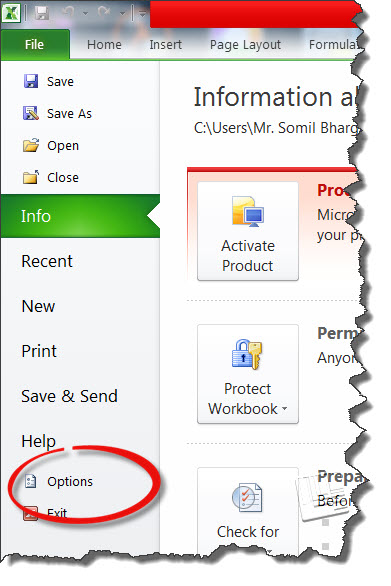
Dumb’s Guide – How To Activate Macros In Excel By Somil Bhargava - June 12, 2016 FacebookTwitterPinterestWhatsAppLinkedinReddItEmailTumblrFlipCopy URL Step 2 From the upper left corner click on “File”. Select the “Options” tab from the menu and a Excel option window will open. activate-macros-step-2 RELATED ARTICLESMORE FROM AUTHOR Offering Financial Help to an Elderly Loved One Without Making It Awkward Why Clutter Can Cost Seniors More Than They Think Micro-Inflation and Its Real-World Effects on Senior Living 3 Budgeting Tips Every Senior Should Know 3 Tips for Putting Money Away For an Emergency Fund Why Smart Patches Are a Must-Have for Modern Senior Healthcare